
This manual provides comprehensive guidance for the 4-channel Boss BX-4 stereo mixer, covering setup, operation, troubleshooting, and specifications for optimal performance.
Overview of the BX-4 Stereo Mixer
The Boss BX-4 is a compact, four-channel stereo mixer designed for diverse audio applications. It features standard jack inputs and outputs, making it versatile for connecting various instruments and devices. While lacking an equalizer or effect level controls, it offers essential mixing capabilities.
Powered by batteries or an AC adapter, the BX-4 provides convenient portability. Its simple design incorporates two red LEDs for left output and one for right, indicating signal presence. Though it lacks dedicated headphone volume control, the BX-4 remains a certified Roland/Boss product, delivering reliable performance as a fundamental mixing solution.
Target Audience for this Manual
This manual is intended for musicians, audio engineers, and anyone utilizing the Boss BX-4 stereo mixer in live performance, recording setups, or general audio applications. It caters to both beginners seeking a straightforward mixing solution and experienced users needing a quick reference guide.
Whether you’re connecting guitars, vocal processors like the VE-5, or a recording interface, this guide provides the necessary information. It’s designed to be accessible, offering clear instructions for setup, operation, and troubleshooting, ensuring all users can effectively harness the BX-4’s capabilities.
Physical Features and Connections
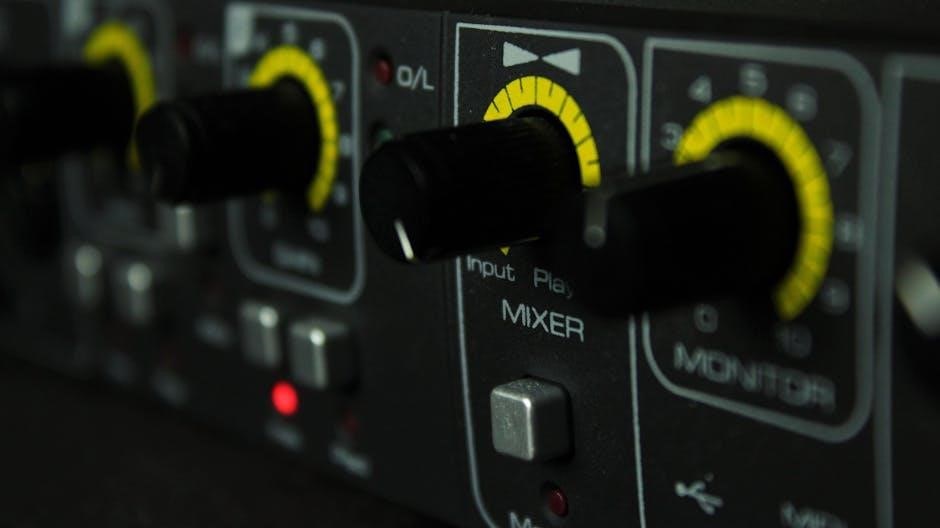
The Boss BX-4 features standard jack inputs/outputs, powered by batteries or an AC adapter, with visual indicators via red LEDs for channel monitoring.
Front Panel Layout
The BX-4’s front panel is designed for straightforward operation. It houses the input jacks for each of the four channels, alongside gain controls to adjust signal levels. Notably, the unit lacks a dedicated equalizer or effect level controls. Visual monitoring is provided through two red LEDs for the left output and one for the right.
A key observation is the absence of a volume control specifically for the headphone output. All connections utilize standard jack formats, ensuring compatibility with a wide range of audio equipment. This minimalist approach prioritizes simplicity and ease of use, delivering a certified Roland/Boss experience in a compact form factor.
Rear Panel Connections
The rear panel of the Boss BX-4 focuses on essential input and output connectivity. It features standard jack connections for all audio signals, maintaining compatibility with common studio and live sound equipment. Power is supplied either through an AC adapter or batteries, offering flexibility for various usage scenarios.
Crucially, the rear panel doesn’t include complex routing options or additional features. It’s a streamlined design centered around core functionality. This simplicity reflects the BX-4’s intended role as a compact and efficient mixing solution, prioritizing direct signal flow and ease of integration into existing setups.
Power Supply Options
The Boss BX-4 offers versatile power solutions for diverse applications. It can operate using a standard AC adapter, providing a reliable power source for extended use in stationary setups. Alternatively, the mixer supports battery operation, granting portability and convenience for mobile performances or locations without readily available power outlets.
This dual-power capability ensures uninterrupted operation, whether you’re performing on stage, rehearsing in the studio, or recording in the field. The flexibility to switch between AC and battery power makes the BX-4 a practical choice for musicians and audio professionals on the go.

Understanding the Channels
The Boss BX-4 features four channels, including a stereo channel, each with dedicated input and gain controls for precise audio signal management and mixing.
Channel 1 Input and Gain
Channel 1 on the Boss BX-4 serves as a standard mono input, accepting a typical ¼ inch jack connection for instruments or line-level signals. The input is designed to accommodate various source impedances, ensuring compatibility with a wide range of audio devices. Crucially, the gain control for Channel 1 directly influences the input signal’s strength before it reaches the mixer’s internal processing stages.
Proper gain staging is essential; setting the gain too low results in a weak signal, while excessive gain introduces unwanted distortion. Users should carefully adjust the gain knob while monitoring the input level to achieve a clean, strong signal without clipping. This initial gain adjustment significantly impacts the overall sound quality and headroom of the mix.
Channel 2 Input and Gain
Similar to Channel 1, Channel 2 on the Boss BX-4 features a standard mono ¼ inch input jack, designed for connecting instruments or line-level audio sources. The input impedance is optimized for broad compatibility, ensuring clean signal reception from diverse equipment. The gain control for Channel 2 operates identically to Channel 1, allowing precise adjustment of the input signal’s amplitude.
Maintaining optimal gain staging on Channel 2 is vital for achieving a balanced and clear mix. Carefully monitor the input level while adjusting the gain knob to prevent clipping or excessively low signal levels. Proper gain control ensures a strong, undistorted signal, contributing to the overall quality of the audio output.
Channel 3/4 Input and Gain
Channels 3 and 4 on the Boss BX-4 function as a stereo pair, accepting a single stereo ¼ inch input. This configuration is ideal for keyboards, stereo line-level sources, or stereo effects returns. Like the previous channels, these also feature dedicated gain controls for each stereo input. Adjusting the gain allows for precise level matching and optimal signal-to-noise ratio.
Careful gain staging on Channels 3/4 is crucial for maintaining a balanced stereo image and preventing distortion. Monitor the input levels closely while adjusting the gain to ensure a clean and powerful stereo signal. Proper gain control enhances the overall clarity and depth of the mix.
Stereo Channel Functionality
The Boss BX-4 excels in handling stereo sources, offering dedicated functionality for a wider soundstage. Channels 1/2 and 3/4 can operate as independent mono channels or paired as stereo inputs. This flexibility accommodates diverse audio setups, from basic stereo mixing to more complex routing scenarios.
When utilizing stereo channel operation, the BX-4 maintains pan control for each channel, allowing precise placement within the stereo field. This feature is essential for creating a balanced and immersive mix. The stereo functionality ensures a cohesive and professional sound, enhancing the overall listening experience.

Operating the BX-4
Proper operation involves powering the unit, carefully adjusting input levels, utilizing headphone monitoring, and controlling the main output for desired volume.
Powering On and Off
The Boss BX-4 offers flexible power options, functioning reliably with both batteries and an AC adapter, providing versatility for various setups and locations. To power on, simply connect the appropriate power source; the unit will illuminate, indicating it’s ready for use. When using batteries, ensure they are correctly installed for optimal performance.
To power off, disconnect the power source – either remove the batteries or unplug the AC adapter. This simple process conserves energy and protects the mixer when not in use. Always disconnect power during extended periods of inactivity or when making connections to prevent potential issues.
Adjusting Input Levels
Proper input level adjustment is crucial for achieving optimal sound quality with the Boss BX-4. Begin by setting the channel gain knobs to their minimum positions. Gradually increase the gain while monitoring the input signal, aiming for a strong, clear signal without clipping or distortion.
Observe the LED indicators; they illuminate to show signal presence. Avoid letting the LEDs remain constantly lit, as this indicates the signal is too hot. Fine-tune the gain for each channel to balance the overall mix, ensuring all sources are audible and contribute effectively to the final output.
Monitoring with Headphones
The Boss BX-4 allows for convenient monitoring using headphones, essential for private practice or critical listening. Connect your headphones to the designated headphone jack on the front panel. Note that the BX-4 lacks a dedicated headphone volume control; the headphone output level mirrors the main output level.
Adjust the main output level to achieve a comfortable listening volume through your headphones. This method ensures accurate monitoring of the mix before sending it to speakers or a recording device. Always start with a low main output level to protect your hearing.
Main Output Level Control
The main output level control on the Boss BX-4 governs the overall signal strength sent to your amplifiers, recording interface, or other external devices. Carefully adjust this control to achieve the desired volume without clipping or distortion. Begin with the control set to its minimum position and gradually increase it while monitoring the output signal.
Pay close attention to the output meters (if connected externally) or listen for any signs of distortion. Proper gain staging, combined with careful adjustment of the main output level, is crucial for optimal sound quality and preventing damage to connected equipment.

Advanced Features
Explore stereo linking, guitar compatibility, recording interface connections, and seamless integration with vocal processors like the Boss VE-5 for expanded functionality.
Stereo Linking Explained
Stereo linking on the Boss BX-4 allows channels to operate as a single stereo source, enhancing the width and depth of your audio signal. This feature is particularly useful when combining two mono inputs to create a cohesive stereo image. By engaging the stereo link, the pan controls on the linked channels become interconnected, ensuring balanced stereo positioning.
Essentially, adjusting the pan on one channel simultaneously adjusts the pan on the other, maintaining proper stereo separation. This simplifies control and prevents phase cancellation issues. It’s ideal for keyboards, drum machines, or any stereo source requiring precise stereo placement within your mix. Experiment with stereo linking to achieve a professional and polished sound.
Using the BX-4 with Guitars
The Boss BX-4 is a versatile tool for guitarists, enabling blending of multiple instruments or effects processors. Connect guitars directly into the BX-4’s inputs, utilizing the gain control for optimal signal levels. For stereo effects like chorus or reverb, leverage the stereo channels to create a wider soundscape.
The BX-4’s simplicity makes it ideal for quick setups, rehearsals, or live performances. It’s particularly useful for layering multiple guitar parts or combining a guitar with a vocal or backing track. Remember to monitor levels carefully to avoid clipping and ensure a clean, professional guitar tone.
Connecting to a Recording Interface
To record with the Boss BX-4, connect the main stereo outputs to the inputs of your recording interface. Ensure proper gain staging on both the BX-4 and the interface to achieve a strong, clean signal without clipping. The BX-4 acts as a pre-mixer, allowing you to balance levels before they reach your recording software.
This setup is beneficial for recording multiple instruments simultaneously or for creating custom monitor mixes during tracking. Remember to check your interface’s input impedance to ensure compatibility with the BX-4’s outputs for optimal sound quality.
Integrating with Vocal Processors (e.g., VE-5)
The Boss BX-4 seamlessly integrates with vocal processors like the VE-5, enhancing vocal performances during live sets or recordings. Connect the VE-5’s output to one of the BX-4’s stereo channels. This allows you to blend the processed vocal signal with other instruments and control the overall mix using the BX-4’s faders and panning.
Utilize the BX-4’s monitoring capabilities to critically listen to the processed vocal sound. Adjust levels carefully to avoid clipping and ensure a balanced, professional-sounding result. Experiment with the BX-4’s stereo functionality for wider vocal imaging.

Troubleshooting

This section details solutions for common issues like no sound, distortion, hum, or LED indicator problems, ensuring optimal performance of your Boss BX-4 mixer.
No Sound Output
If you experience no sound from your Boss BX-4, begin by verifying all connections – input, output, and power. Ensure the main output level control isn’t set to minimum. Check that input signals are present and active at each channel. Confirm headphones are properly connected, though the BX-4 lacks dedicated headphone volume control.
Also, inspect the power supply; it operates on batteries or an AC adapter. Verify the correct input channel is selected and not muted. If using an external amplifier, confirm its power and volume settings. A faulty cable could also be the culprit, so try replacements.
Distorted Sound
Distorted audio from the Boss BX-4 typically indicates an overloaded input signal. Reduce the gain on the affected channel(s) to prevent clipping. Ensure input sources aren’t outputting excessively high levels. Verify that no effects units connected to the BX-4 are contributing to the distortion. Check all cable connections for damage or poor quality, as these can introduce unwanted noise.
Additionally, confirm the main output level isn’t pushed too high, causing the connected amplifier to distort. Experiment with lowering input gains and the master output to find a clean signal path.
Hum or Noise Issues
Persistent hum or noise with the Boss BX-4 often stems from grounding problems or interference. Ensure all connected equipment shares a common ground connection. Try using shielded cables to minimize external noise pickup. Keep the BX-4 and its connections away from potential sources of interference, like power transformers or fluorescent lights.
Also, verify the power supply is functioning correctly and isn’t introducing noise. Experiment with different power outlets. If the noise persists, isolate each input to identify the source of the problem.
LED Indicator Problems
If the BX-4’s LEDs aren’t illuminating correctly, first check the power supply connection. The manual notes the BX-4 utilizes red LEDs for left and right output indication. A consistently unlit LED might indicate a channel issue or internal fault; Dim or flickering LEDs could suggest a loose connection or low voltage.
Inspect the connections to the affected channel. If the problem persists after verifying power and connections, consult a qualified technician for further diagnosis and potential repair, as internal component failure is possible.

Technical Specifications
The Boss BX-4 boasts specific input/output impedances, a defined frequency response, and low power consumption – details crucial for integrating it into your setup.
Input Impedance
Understanding input impedance is vital for signal compatibility with the Boss BX-4. While precise values aren’t explicitly detailed in readily available resources, the BX-4 is designed to accept standard line-level signals from a variety of sources. This includes instruments like guitars, keyboards, and audio interfaces.
Generally, a higher input impedance is preferable as it minimizes loading effects on the source signal, preserving its original tone and clarity. The BX-4’s design, being a Roland/Boss product, suggests a well-considered impedance matching scheme to ensure optimal performance across diverse audio connections. Users shouldn’t encounter significant impedance-related issues with typical audio gear.
Output Impedance
The Boss BX-4’s output impedance is a crucial factor when connecting it to subsequent devices like amplifiers, recording interfaces, or powered speakers. Specific output impedance values aren’t prominently featured in available documentation, but the BX-4 is engineered for compatibility with standard professional audio equipment.
A low output impedance is generally desirable, as it allows for efficient signal transfer with minimal loss or alteration. This ensures a clean and robust signal path to your destination device. The BX-4’s Roland/Boss pedigree suggests a carefully designed output stage to deliver reliable performance and seamless integration within a broader audio system.
Frequency Response
Determining the precise frequency response of the Boss BX-4 proves challenging, as detailed specifications aren’t widely published in readily available documentation. However, as a professional-grade mixer from Roland/Boss, it’s designed to handle the full audible spectrum with accuracy and minimal coloration.
Users can expect faithful reproduction across the typical 20Hz to 20kHz range, suitable for diverse audio sources like instruments and vocals. While specific dB deviations aren’t listed, the BX-4 prioritizes clear signal transmission, ensuring a balanced and natural sound without unwanted peaks or dips in frequency response.
Power Consumption
The Boss BX-4 mixer is designed for efficient operation, offering flexibility with both battery and AC adapter power options. Specific power consumption figures aren’t prominently detailed in the official documentation, but it’s generally considered low, contributing to portability and extended battery life.
Typical current draw is expected to be within a reasonable range for a compact 4-channel mixer. Users can anticipate minimal heat generation during prolonged use. Power requirements are standard, making it compatible with widely available AC adapters, ensuring convenient operation in various settings.

Manual Updates and Resources
Access the latest Boss BX-4 manual in PDF format online, with the MD5 checksum (EB0ED28929FC0FE68C53A19D1EC69628) for verification of file integrity.
Downloading the Latest PDF Manual
Users can easily download the most current Boss BX-4 manual as a PDF document directly from online resources. This ensures access to the latest information regarding features, operation, and troubleshooting steps. The manual was last updated on September 29, 2023, and originally published on August 10, 2012.
It’s recommended to verify the downloaded file’s integrity using the provided MD5 checksum (EB0ED28929FC0FE68C53A19D1EC69628) to confirm it hasn’t been corrupted during the download process. This PDF guide details everything needed for optimal use of this 4-channel stereo mixer.
MD5 Checksum Verification (EB0ED28929FC0FE68C53A19D1EC69628)
Ensuring the integrity of the downloaded Boss BX-4 manual is crucial. Utilizing the MD5 checksum – EB0ED28929FC0FE68C53A19D1EC69628 – allows users to verify the file hasn’t been corrupted during download. This process confirms the manual is complete and unaltered, providing reliable information.
Checksum verification involves a calculation based on the file’s content; a match confirms authenticity. If the checksum doesn’t match, re-download the manual. This simple step safeguards against potential issues arising from incomplete or damaged files, guaranteeing access to a trustworthy guide for your BX-4 mixer.
Publication Date and Version Information (August 10, 2012)
The original Boss BX-4 manual was first published on August 10, 2012. This date signifies the initial release of documentation supporting the 4-channel stereo mixer. While updates may exist, this represents the foundational version.
Understanding the publication date is helpful for context, especially when referencing older online resources or troubleshooting based on initial specifications. The manual has seen an update as recent as September 29, 2023, but the core information stems from the 2012 release, providing a historical baseline for the BX-4’s functionality.
Online Support and FAQs
For additional assistance beyond this manual, numerous online resources are available to Boss BX-4 users. Websites dedicated to music equipment often host forums where users share experiences and solutions to common problems.
Frequently Asked Questions (FAQs) can often resolve quick issues without extensive troubleshooting. Searching online for “Boss BX-4 FAQs” will yield helpful results. Furthermore, the official Roland/Boss support website provides access to updated information, potential firmware updates, and direct contact options for technical support if needed.

Safety Information
Always follow important safety precautions during operation, review warranty details carefully, and adhere to proper disposal considerations for the Boss BX-4 mixer.
Important Safety Precautions
To ensure safe operation of the Boss BX-4 stereo mixer, always observe these precautions. Avoid operating in damp or wet locations to prevent electrical shock. Do not disassemble or modify the unit, as this could result in hazards and void the warranty. Ensure proper ventilation around the mixer to prevent overheating.
Always use a properly grounded power outlet and inspect the power cord for damage before each use. Disconnect the power cord during extended periods of non-use and before cleaning. Keep the unit away from extreme temperatures and direct sunlight. Never insert objects into the unit’s vents or openings.
Warranty Information
Boss provides a standard warranty covering defects in materials and workmanship on the BX-4 stereo mixer. The warranty period typically begins from the original date of purchase, as indicated on the purchase receipt. This warranty does not cover damage resulting from misuse, accidents, unauthorized modifications, or normal wear and tear.
To obtain warranty service, contact Boss customer support with proof of purchase and a detailed description of the issue. Shipping costs to and from the service center are the responsibility of the owner. The warranty is void if the unit has been opened or repaired by unauthorized personnel.
Disposal Considerations
Proper disposal of the Boss BX-4, and its associated accessories, is crucial for environmental responsibility. Do not dispose of the unit with general household waste. Electronic equipment contains hazardous materials that can harm the environment and human health if improperly handled.
Instead, adhere to local regulations regarding electronic waste (e-waste) recycling. Many communities offer designated collection points or recycling programs for electronic devices. Contact your local waste management authority for information on appropriate disposal methods in your area, ensuring a sustainable approach.